Your Legacy Systems Are the Reason AI Isn't Working
Organizations that modernize before AI deploy 60-80% faster. Here's why your AI tools are sitting unused and a practical approach to fixing it.
8 min read
The $24.98 Billion Problem Nobody Wants to Talk About
The legacy system modernization market hit $24.98 billion in 2025. It's projected to reach $56.87 billion by 2030. Most of that growth comes from one thing: companies bought AI tools, plugged them in, and nothing happened. The tools need clean data and modern APIs. The systems they connect to offer neither.
Here's the pattern we see over and over. A manufacturing company with 200 employees buys an AI-powered demand forecasting tool. The sales pitch was compelling: predict demand, reduce waste, cut inventory costs by 20%. Six weeks later, the tool sits unused. The reason? Their 15-year-old ERP system stores data in formats the AI tool can't read. Their product codes follow a naming convention that only two people in the company understand. The database has 47 tables, no documentation, and three different date formats.
The AI tool works fine. The company's systems don't.
Why "Just Add an API Layer" Is Harder Than It Sounds
When companies discover their systems can't talk to modern AI tools, the first suggestion is usually "build an API on top of your existing system." This sounds reasonable. In practice, it's where projects go to die.
Legacy systems hide business logic in places nobody expects. A payroll system from 2009 might calculate overtime using a stored procedure that references a lookup table that hasn't been documented since the original developer left. An inventory system might handle backorders through a series of database triggers that fire in a specific sequence. Nobody wrote it down. The system works, so nobody looked inside.
To build an API on top of that, you have to reverse-engineer business rules that exist only as code. Miss one rule and the API returns wrong data. The AI model trained on that data makes wrong predictions. The company blames the AI.
We worked with a distribution company that tried this approach. They spent four months building an API layer on their warehouse management system. The API worked for standard orders. But their system handled rush orders, backorders, and partial shipments through 23 different code paths, most written by different developers over 12 years. The API covered 6 of them. The AI tool that consumed the API had accurate data about 40% of the time. They scrapped the project.
What Organizations That Modernize First Actually Get
Deloitte's 2025 Tech Trends report found that organizations that modernize their core systems before deploying AI report 60-80% faster AI deployment timelines. That tracks with what we see in practice. Modernization fixes the prerequisites AI needs: standardized data formats, documented APIs, consistent business rules, and infrastructure that supports integration.
A healthcare services company we consulted with ran the numbers both ways. Option A: bolt AI onto their existing claims processing system (built in 2011, running on a customized Oracle database). Estimated timeline: 8-12 months, with a high likelihood of data quality failures based on the system's inconsistent field formats. Option B: modernize the claims system first (4 months), then add AI-powered claims routing (2 months). Option B cost 30% more upfront but delivered a working system in 6 months instead of the 12+ months Option A would have taken, with clean data from day one.
The Modernization-First Approach
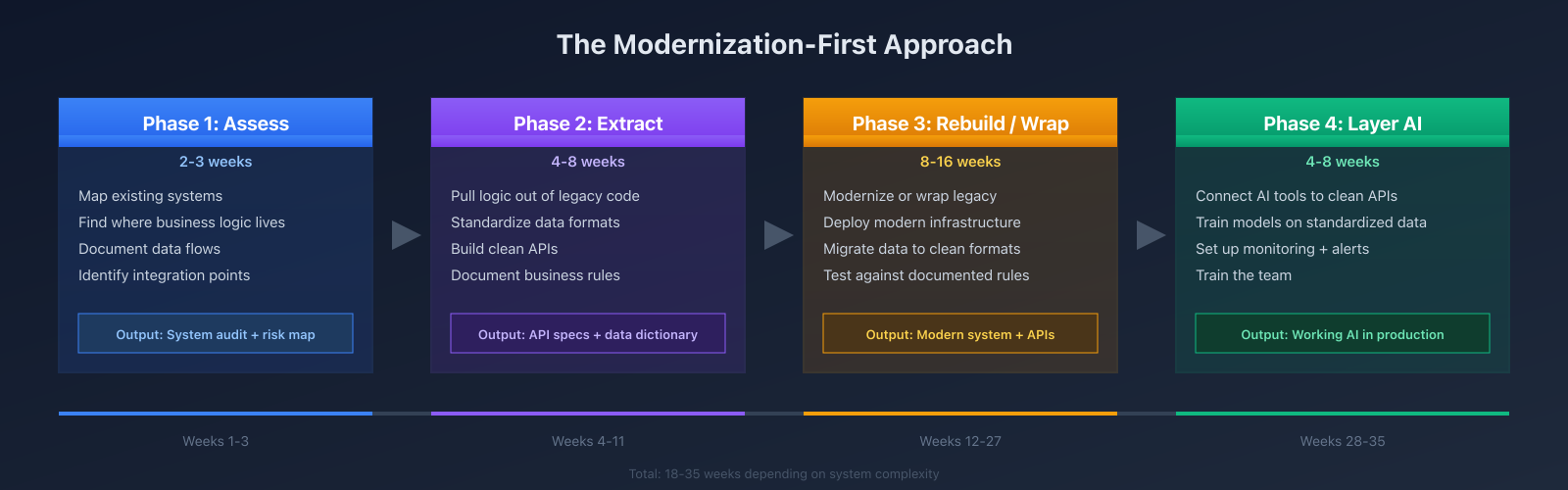
Here's what the process looks like when you do it in the right order.
Phase 1: Assess (2-3 weeks). Map your existing systems. Identify where business logic lives. Document data flows between systems. Most companies are surprised by what they find here. One client discovered they had customer data in 11 different systems, with no single source of truth. Another found that their "simple" invoicing system had 340 business rules embedded in stored procedures.
Phase 2: Extract and standardize (4-8 weeks). Pull business logic out of legacy code and document it. Standardize data formats. Build clean APIs that expose your data in formats modern tools can consume. This is the phase that takes discipline. The temptation is to "just fix the most important parts" and move on. That approach fails because AI models need consistent data, not data that's clean in some tables and messy in others.
Phase 3: Rebuild or wrap (8-16 weeks). Depending on the system's age and architecture, either rebuild it with modern technology or wrap it in a service layer that insulates the rest of your stack from its quirks. Rebuild when the system is unsupported, undocumented, or written in a language nobody maintains anymore. Wrap when the system works well but just needs better interfaces.
Phase 4: Layer AI (4-8 weeks). With clean data, documented APIs, and modern infrastructure, AI deployment becomes routine. The forecasting tool reads standardized data through a clean API. The chatbot pulls from a documented knowledge base. What felt impossible six months ago takes a few weeks.
AI Actually Speeds Up the Modernization Itself
AI tools can help with the modernization work itself. Large language models read legacy code and explain what it does. They generate test suites for undocumented systems, so you can refactor with confidence that you haven't broken anything. They identify patterns in stored procedures and help extract business rules into documentation.
GitHub's internal data shows that AI-assisted coding tools reduce the time developers spend on "boilerplate and glue code" by 35-40%. Legacy modernization is mostly that kind of work: writing adapters, translating between data formats, building test fixtures. On the COBOL project below, AI tools cut the documentation phase from 6 weeks to 2.
One practical example: a client had a COBOL-based billing system with 180,000 lines of code. Before AI tools, the estimate for understanding and documenting that codebase was 6-8 weeks of a senior developer's time. We used Claude to analyze the code, identify business rules, and generate documentation. That cut the timeline to 2 weeks. The AI didn't write the new system. It read the old one and told us what it did.
The Insurance and Compliance Angle
Cyber insurers have started treating unsupported software platforms as unacceptable risk. If you're running Windows Server 2012, an end-of-life database, or an application framework that no longer receives security patches, your insurance premiums go up. Some carriers won't cover you at all.
In 2024, Marsh McLennan reported that companies running unsupported software paid 22% higher cyber insurance premiums on average. For a mid-size business paying $50,000/year for cyber coverage, that's $11,000 in extra premiums, every year, for doing nothing.
Compliance frameworks are tightening too. SOC 2 Type II auditors now specifically ask about end-of-life software. PCI DSS 4.0, which became mandatory in March 2024, requires that "all system components are protected from known vulnerabilities." If your payment processing touches a system that hasn't been patched in three years, that's a finding.
Legacy modernization reduces risk on its own. The fact that it also makes AI adoption possible is a bonus.
The Cost Comparison
We ran numbers on 14 client projects over the last two years. Here's what we found.
"Add AI directly" approach: Average project timeline of 9.2 months. 60% of projects required significant rework after initial deployment due to data quality issues. Average total cost (including rework): $180K-$320K. Three of the 14 projects were abandoned entirely.
"Modernize first" approach: Average project timeline of 7.8 months (including modernization). Only 15% required rework. Average total cost: $150K-$280K. Zero abandoned projects. The modernize-first approach costs less and finishes sooner because it eliminates the rework cycle. You spend more upfront on modernization, but you don't spend it again six months later when the AI integration fails.
Signs Your Systems Aren't AI-Ready
If three or more of these apply to your business, your systems need work before AI will deliver value:
Your core business system is more than 10 years old and hasn't been substantially updated.
Your team exports CSV files to move data between systems.
Business logic lives in spreadsheets that only one person understands.
Your database uses inconsistent formats for dates, phone numbers, or addresses.
Your software vendor went out of business or stopped releasing updates.
You can't get data out of a system without calling the vendor or a consultant.
Your IT team spends more than 30% of their time maintaining existing systems instead of building new ones.
Every modernization project we've run began with a list like this. These are starting points, not dead ends.
What to Do Next
If you've bought an AI tool and it's sitting unused, or you're planning an AI investment and your systems are old, start with an assessment. A proper technical assessment takes 2-3 weeks and gives you a clear picture: what you're working with, what needs to change, and a realistic timeline.
Most companies skip this step because they want to get to the "AI part." That's how you end up four months into a project with nothing to show for it. The assessment prevents that.
Not sure if your systems are AI-ready?
We run a free technical assessment. 30-minute call, we look at your stack and give you a clear answer: what needs to change, how long it will take, and whether AI will work with what you have today.