


What Is Cowork, Exactly?
Anthropic launched Claude Cowork on January 12, 2026. It's a desktop AI agent that handles file and task management - no coding required. You'll find it as a tab inside the Claude Desktop app, sitting right next to Chat and Code.
It works nothing like chatting with Claude. You tell it what you need, give it access to a folder on your Mac, and walk away. Anthropic calls it "less like a back-and-forth and more like leaving messages for a coworker." You can stack up multiple tasks. Claude chips away at them in parallel - sometimes running for 20-30 minutes without you touching a thing.
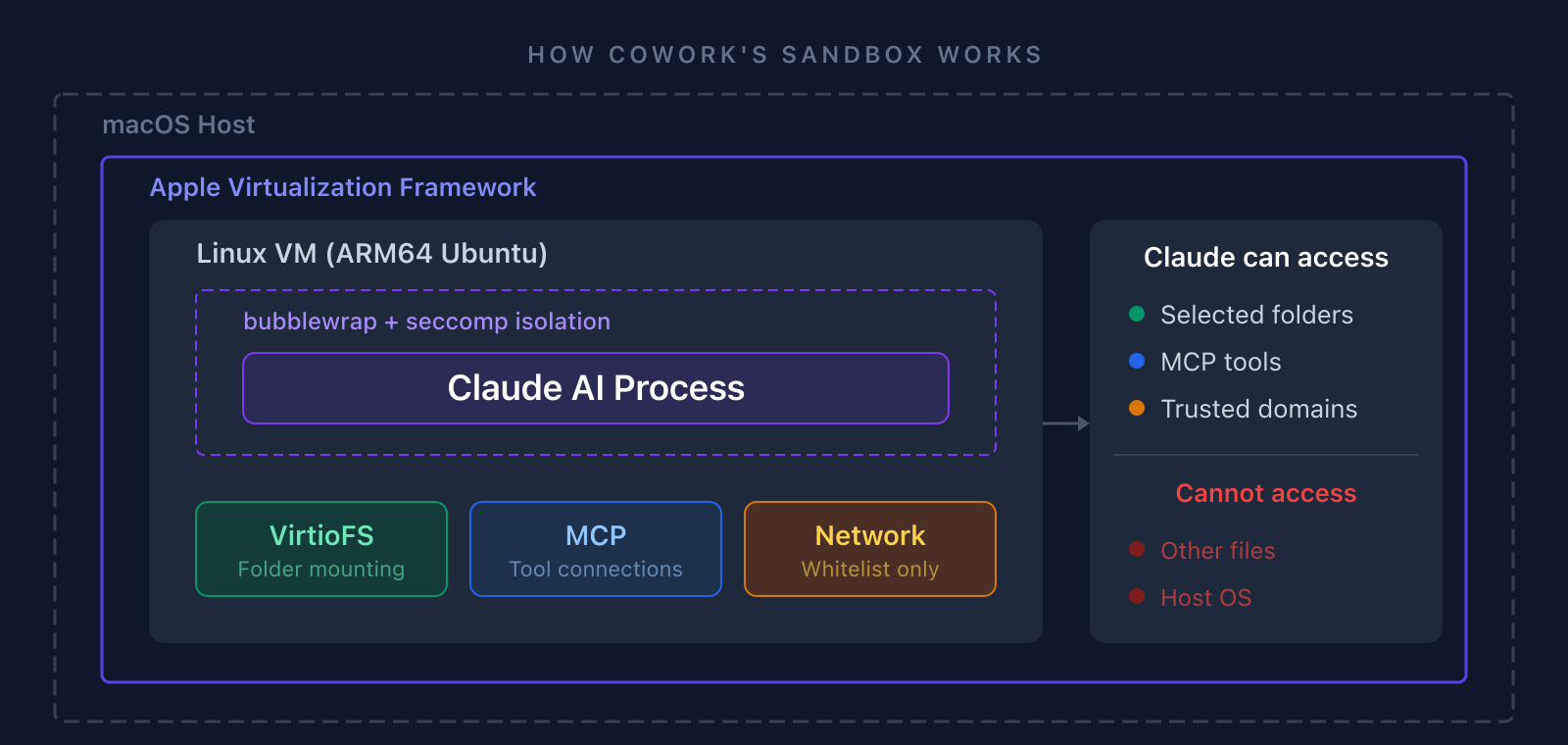
Technically, it's the same engine as Claude Code with two additions: a visual interface (no terminal) and a sandboxed Linux VM that prevents Claude from accessing anything you haven't explicitly allowed.
The isolation model is worth understanding. Cowork boots a custom Ubuntu instance using Apple's Virtualization Framework, then adds a second layer of process isolation with bubblewrap and seccomp. Your selected folders are mounted read/write via VirtioFS, MCP tool connections pass through for external integrations, and network access is whitelisted. Everything else - your other files, the host OS, unrestricted internet - is walled off.
Available on all paid Claude plans ($20/month Pro and up), macOS only, labeled a research preview.
Worth noting: Anthropic built Cowork using Claude Code in about 10 days, according to Boris Cherny, head of Claude Code. The plugin ecosystem followed within three weeks.
What Can It Actually Do?
More than you'd expect from something called "file management."
File Organization - Sort folders by type, date, or content. Rename files based on what's inside them. Detect duplicates via hashes. One tester had 500 files organized in under 10 minutes.
Document Creation - Excel spreadsheets with working formulas, PowerPoint decks, formatted Word docs, PDFs. It handles merging, splitting, and even form-filling.
Data Extraction - Receipt photos become expense spreadsheets. Bank exports get processed. It'll run Python analysis on CSV data and spit out reports with charts.
Batch Conversion - docx to PDF, image compression, format changes in bulk. Uses LibreOffice and Ghostscript locally (asks before installing anything).
Browser Automation - Clicking buttons, filling forms, navigating tabs, taking screenshots. Works through the Chrome extension. It works, but it's slow - screenshot round-trips add up fast.
Plugins - 11 open-source plugin bundles covering productivity, marketing, sales, finance, legal, and IT. There's even a meta-plugin for building your own. Each bundle is a combination of skills (domain expertise that Claude invokes automatically), commands (quick-start workflows you trigger by name), connectors (MCP-based access to external tools like Slack, HubSpot, or your own APIs), and sub-agents (specialized Claude instances for multi-step tasks).
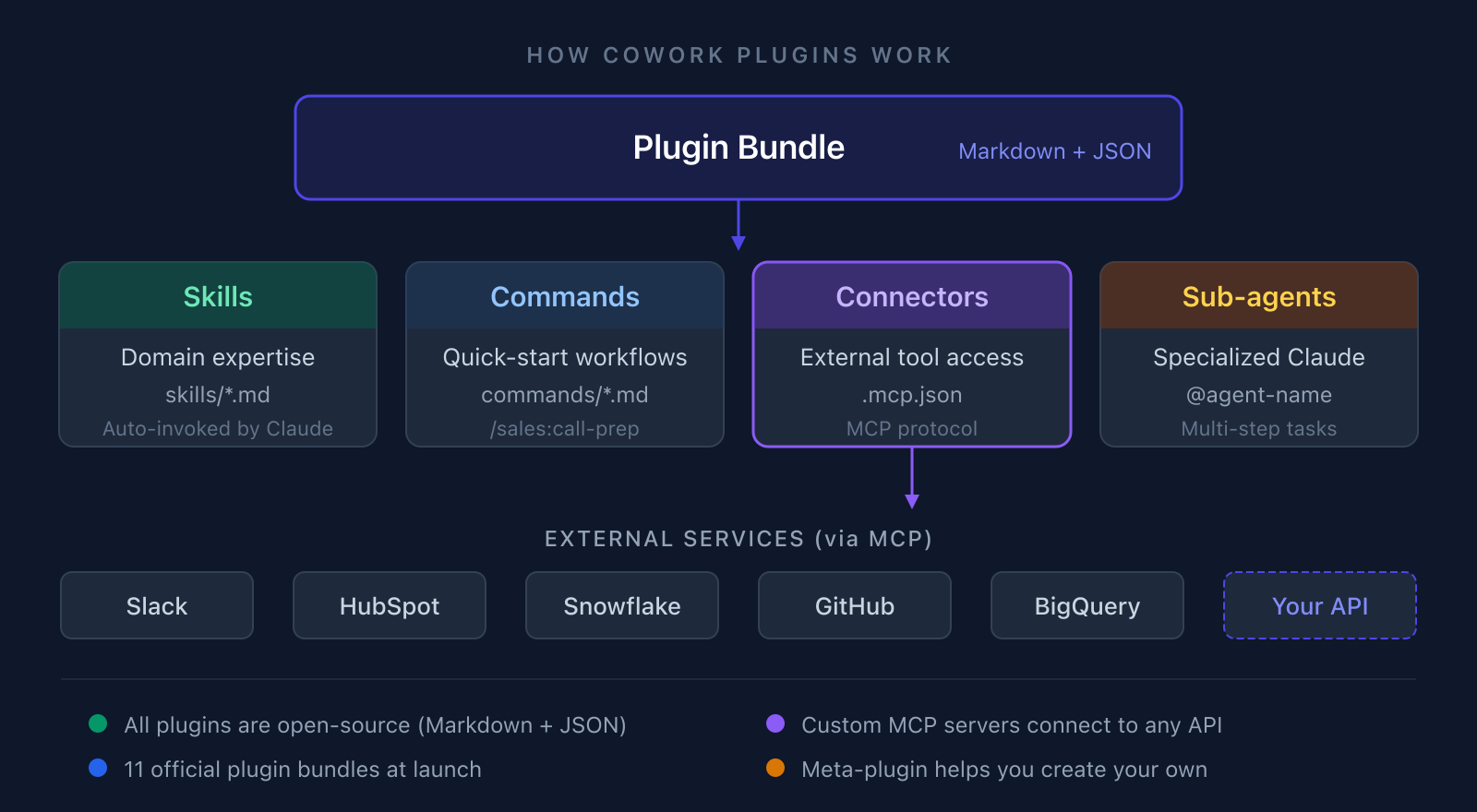
The entire plugin system is open-source - just Markdown files and JSON configs. That matters because it means anyone can inspect, modify, or build new plugins without waiting on Anthropic. We'll come back to this in the section on how we can help.
Real Projects We've Seen It Handle
Here's where it gets interesting. These aren't hypotheticals - they're actual workflows people are running.
Expense reports from scratch: A finance team dropped 3 months of receipt photos and bank statements into a folder. Cowork OCR'd every receipt, matched them against bank transactions, flagged 12 discrepancies, and produced a formatted Excel file. What used to take their office manager most of a Friday afternoon was done in 40 minutes.
Client proposal assembly: A consulting firm pointed Cowork at their past proposals folder plus a new project brief. It pulled relevant case studies, drafted the proposal in their Word template, generated comparison charts, and even formatted the appendix. The senior consultant spent an hour polishing instead of four hours writing from scratch.
CMS migration - 200 Word docs: A marketing agency needed to move years of content from Word to Markdown for a new website. Cowork converted all 200 documents, preserved formatting, extracted embedded images into organized folders, and flagged 15 files with broken references. Two weeks of intern work, done overnight.
Research paper synthesis: A product team fed it 30+ PDFs - competitor analyses, market reports, academic papers. Cowork read through everything, extracted key findings, identified contradictions between sources, and produced a 12-page structured brief. Not perfect, but a solid first draft that saved about two days of reading.
The messy Google Drive problem: We all have one. Thousands of files, no naming convention, duplicates everywhere. One reviewer unleashed Cowork on 500 files. Ten minutes later: everything organized by type and date, 47 duplicates flagged, and a summary of what was actually in there.
How It Compares to Chat and Code
Anthropic now ships three ways to use Claude, and each targets a different user and a different kind of work. Chat is the browser-based conversational interface everyone knows. Code is the terminal agent for developers. Cowork sits between them - a desktop app for knowledge workers who need Claude to actually do things with their files, not just talk about them.
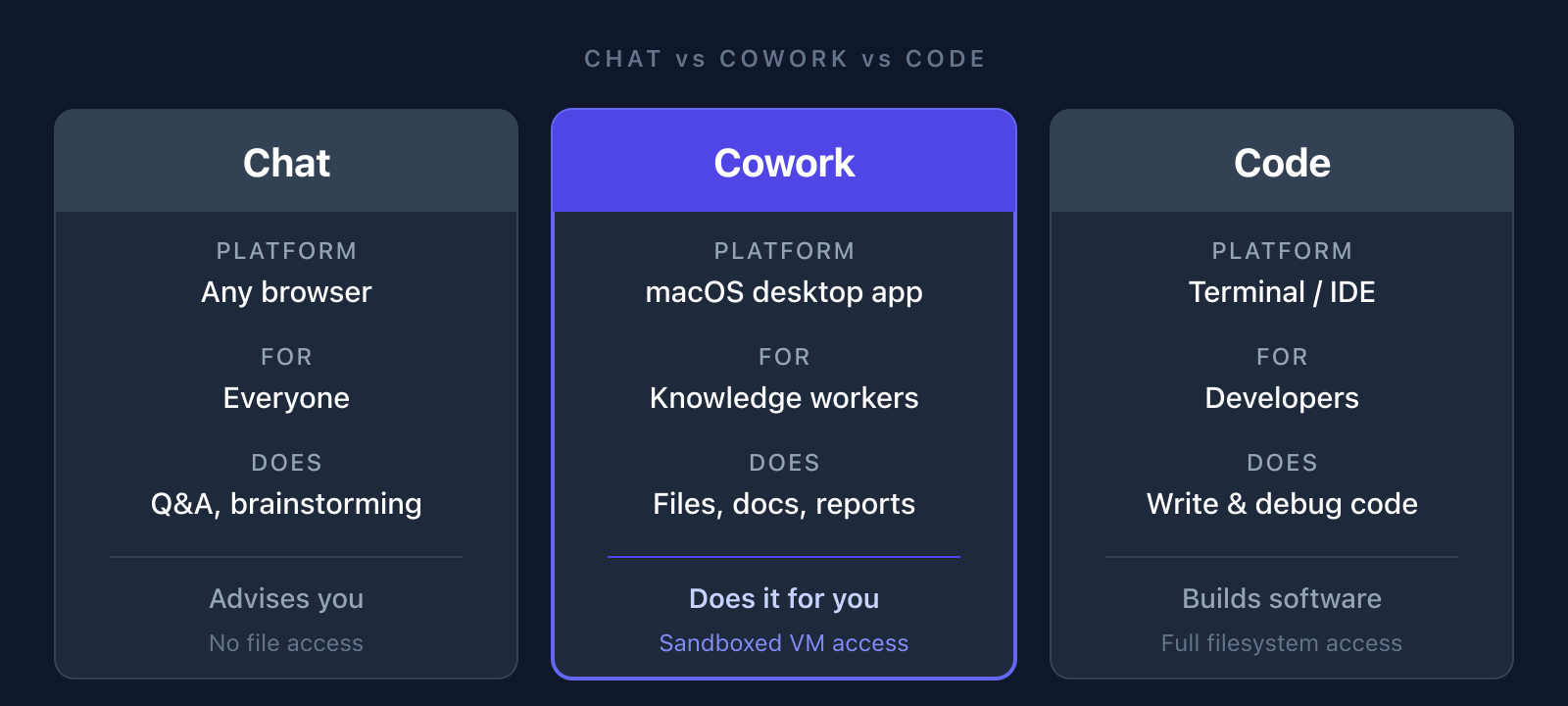
The key distinction: Chat advises you, Cowork does it for you, Code builds software. Chat has no file access. Code has full filesystem access with no guardrails. Cowork lands in the middle - it can read and write files, but only inside a sandboxed VM with access limited to the folders you explicitly grant.
Developer Simon Willison's take: Cowork is essentially Claude Code wrapped in a friendlier interface with a filesystem sandbox already configured. The VM isolation is actually a safety win over Code - Claude can only touch the specific folders you've granted access to.
Where It Falls Short
It's a research preview. That shows.
Platform lock-in: macOS only right now. Windows is supposedly coming mid-2026, but there's no Linux or mobile. Your Mac has to stay open and awake the entire time - close the lid or let it sleep and your session dies. No memory between sessions either, so every task starts from zero.
Excel is its weak spot: Simple spreadsheets work fine. But throw merged cells, section headers, or multi-region layouts at it and things break. The underlying Python libraries expect clean columnar data, so anything creative with Excel formatting tends to trip it up. Files over about 10 MB can get quietly skipped during batch jobs too.
Security concern worth reading: Anthropic openly acknowledges prompt injection as a real risk. Malicious content hidden in a file could alter Claude's behavior. Security researchers at PromptArmor have already demonstrated file exfiltration attacks. Cowork activity doesn't show up in Audit Logs, Compliance API, or Data Exports. Don't use it for anything regulated.
Here's what bugs us most: Claude can delete files. It's supposed to ask first, and usually does. But if a malicious document triggers unexpected behavior through prompt injection, non-technical users won't know something's wrong. That's a real gap.
Token limits bite hard: Agentic tasks burn through tokens way faster than regular chat. Even the $200/month Max plan runs into limits during heavy sessions. On the $20/month Pro plan? You'll hit the ceiling fast on anything serious.
What Reviewers Are Saying
Coverage is mixed, leaning positive for beta software.
WIRED called it "a nice surprise" after years of underwhelming AI agents. It works, but you'll spend the first few sessions learning how to phrase instructions the right way. Simon Willison praised the architecture but raised legitimate concerns about the security guidance being inadequate for non-technical users.
DataCamp found Word output reliable but Excel output problematic. Browser automation was painfully slow - unsubscribing from three newsletters took over 30 minutes. On the flip side, Hackceleration ran a six-week trial across a five-person team and estimated 6-8 hours of weekly savings on file organization and report prep. A junior team member learned the tool in under 45 minutes.
The pattern we see: non-technical users love having capabilities they never had before. Power users and developers shrug - they see a GUI wrapper over Claude Code. Developer Claire Vo's main complaint was too many approval prompts and too much technical detail exposed. Everyone agrees on two things: it burns through usage limits too fast, and it genuinely automates hours of tedious work.
How We Can Help You Get Real Value from Cowork
Cowork is impressive out of the box. But there's a gap between "this is cool" and "this saves my team 8 hours a week." The tool is powerful, the plugin system is flexible, and the integration options are real - but getting there takes technical work that most teams aren't set up to do themselves.
Here's where a development team actually makes a difference.
Custom plugin development: Cowork's plugin system is entirely open-source - Markdown files, JSON configs, and MCP server connections bundled together. Anthropic ships 11 plugin bundles covering sales, finance, legal, marketing, and more, but they're general-purpose by design. If your workflow needs a plugin that pulls data from your specific CRM before generating reports, routes processed documents into your internal systems, or enforces your company's formatting standards - that's custom development work. The plugin architecture supports it. Somebody just needs to build it.
MCP server development: This is the big one. Cowork connects to external tools through Model Context Protocol servers - the same open standard that powers Claude Code's tool integrations. Pre-built MCP servers exist for Slack, HubSpot, Snowflake, BigQuery, GitHub, and a few dozen others. But if you need Cowork to talk to your internal API, your specific ERP, or a database that doesn't have an MCP server yet - someone needs to write one. It's Python (or any language), it's well-documented, and it's exactly the kind of integration work we do.
Connector reliability: Early users consistently report that external connectors aren't stable yet. Gmail, Google Drive, and third-party app integrations break in ways that non-technical users can't debug. Building robust, tested MCP connectors with proper error handling and retry logic turns a flaky demo into a production workflow.
Enterprise gaps that need filling: Cowork doesn't log activity to Anthropic's Audit Logs, Compliance API, or Data Exports. There's no per-user access control - the admin toggle is all-or-nothing across your entire org. Plugins are stored locally with no centralized management. For any team in a regulated industry, these are blockers. Custom logging MCP servers, access control middleware, and plugin deployment pipelines can fill these gaps until Anthropic catches up.
Session memory and context: Cowork starts fresh every session. It doesn't remember what it did yesterday, what your preferences are, or what your file naming conventions look like. We can build external context stores - structured files that Cowork reads at the start of each session to pick up where it left off, loaded with your team's terminology, processes, and institutional knowledge.
Security guardrails: Prompt injection isn't theoretical here - security researchers have already demonstrated file exfiltration attacks against Cowork. Before you point it at anything sensitive, you need input sanitization layers, file scanning workflows, monitoring that catches unusual behavior, and clear policies for what should and shouldn't go through AI processing. Anthropic's own security guidance tells non-technical users to "watch out for suspicious actions" - that's not a security strategy.
Workflow design and team training: The difference between Cowork saving your team 2 hours a week and 10 hours a week usually comes down to how instructions are written and how files are structured. We design skill files tuned to your specific tasks, build shared prompt libraries your team can reuse, and document the edge cases that trip up your particular file types.
Should You Try It?
It's not a finished product. It's a preview of where AI-assisted work is heading. But for certain workflows, it already saves real time today.
Worth trying if: You're on macOS, you deal with file organization or document prep regularly, you don't mind beta quirks, and you have a Pro plan or higher. Batch file operations and document generation are the strongest use cases right now - they work reliably and the time savings are measurable.
Skip it for now if: You need Windows support, you work heavily with complex Excel layouts, you require enterprise security and audit trails, or you need fast browser automation. All valid dealbreakers.
The bigger picture: Cowork was built in 10 days, got plugins in three weeks, and its January launch contributed to a selloff worth hundreds of billions across SaaS stocks. Whether you use it today or not, the direction is clear - AI agents handling your tedious file and document work is where things are going. The trajectory matters more than the current rough edges.